How to Download Your Free CIBIL Report Online (Step-by-Step 2026)

Most people only remember their CIBIL report exists when a bank suddenly asks for it. And by then, it's usually a bit too late.
Here's how it typically plays out: you apply for a loan, the bank checks your credit profile, something looks off, and your application gets delayed or rejected. That's usually the moment people realise they should've checked their report much earlier. Many people go through this exact story, the report existed the whole time, nobody just thought to look at it first.
Here's the good part though, you don't need to wait for a bank to be the one showing you your own report.
You can download it yourself, for free, straight from the official CIBIL website, in just a few minutes.
And it's not limited to CIBIL either, you're legally entitled to a free credit report once a year from all four credit bureaus operating in India.
Want to check your credit report from any of India's four credit bureaus? We've put the official report links and step-by-step guides for CIBIL, Experian, Equifax, and CRIF High Mark together in one place.
Each bureau card includes the relevant guide to help you get your report.
For this guide though, let's focus on getting your CIBIL report specifically, step by step. This is the exact sequence to follow every year.
Why checking your CIBIL report regularly actually matters
Your CIBIL report is really a running record of every loan and credit card you've held, your month-by-month payment history, your personal and contact details, and the score that sums all of it up. If even one of those is wrong, it directly affects your loan approvals and the interest rate you're offered. Since it costs nothing to check, there's really no good reason to keep putting it off.
Step 1: Visit the official CIBIL website
Go to: CIBIL
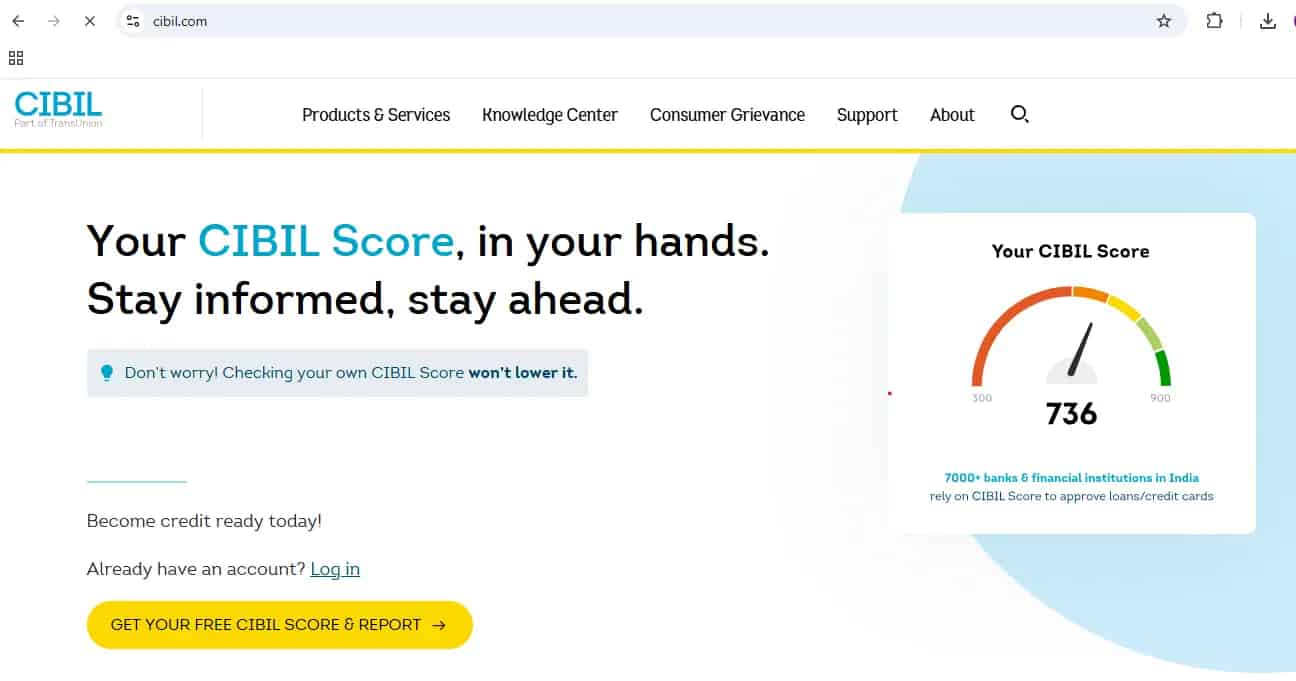
On the homepage, click:
This kicks off the registration process.
Step 2: Enter your details (all fields are required)
You'll now see a form titled Enter Your Details.
Fill in:
- Email address (this becomes your username)
- Password and confirm password
- First name and last name
- ID Type and ID Number (such as PAN)
- Date of birth
- Pincode
- Mobile number
You'll also see a declaration statement allowing CIBIL to verify your identity.
⚠️ Important: be extremely careful here
While registering, every detail you enter becomes part of your CIBIL login identity.
If you make a mistake here, wrong email, wrong mobile number, wrong ID number, a spelling mistake in your name, correcting it later is genuinely difficult, and sometimes needs you to contact support with proof documents. This step trips people up more than any other step in the whole process, purely because it looks like a routine signup form and nobody slows down for it.
So before clicking Accept and Continue, double-check every field carefully.
This step takes one extra minute, but it can save you a lot of trouble later.
Once you've verified everything, tick the checkbox and click Accept and Continue.
Step 3: OTP verification
An OTP will be sent to your entered mobile number. In some cases, you may also receive it on your email address, or on both.
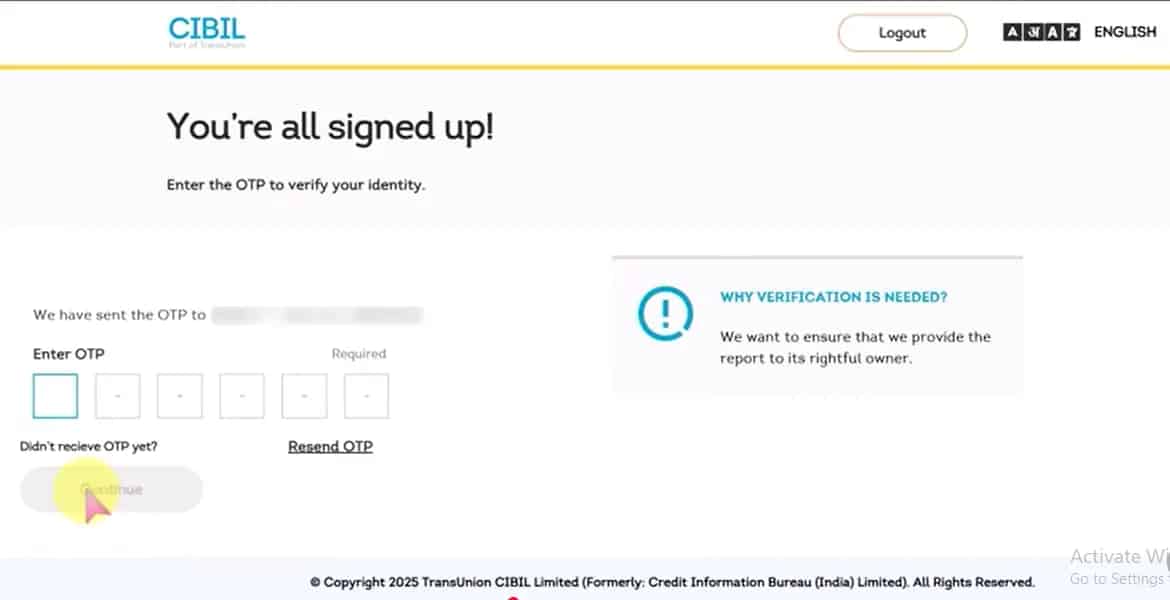
Enter the OTP you receive and click Continue.
Step 4: "Is this a trusted device?"
You'll now see a screen asking:
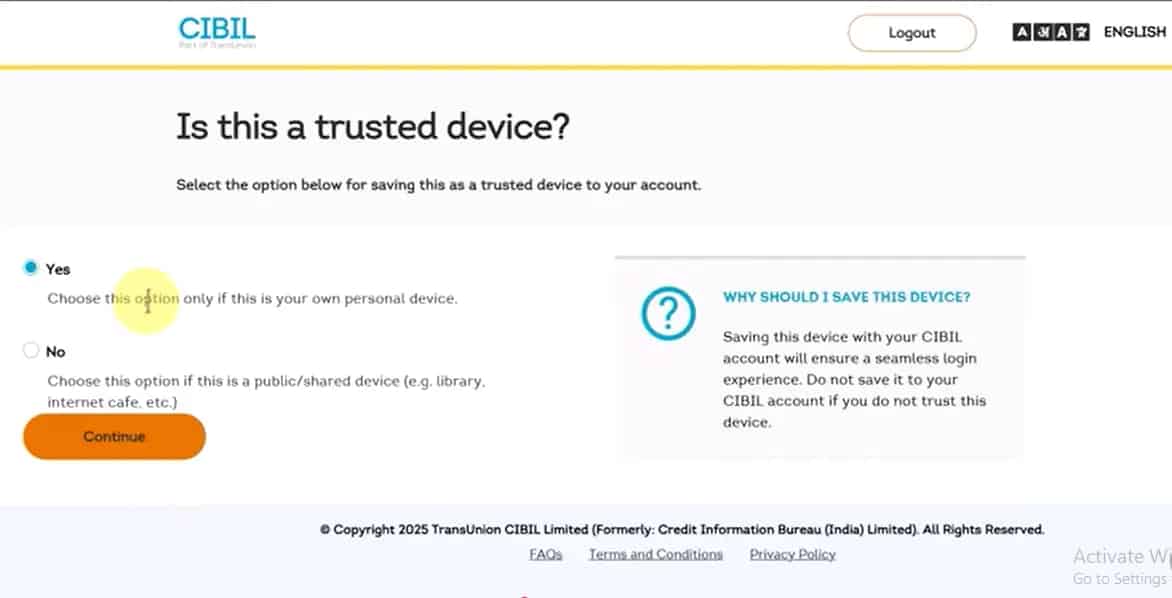
This is purely a security step. Choose Yes only if it's your own personal phone or laptop, and No if you're on a public or shared device. Then click Continue.
Step 5: Signup successful, go to Dashboard
You will see a message saying Signup Successful.
Click Go to Dashboard.
You're now inside your CIBIL account.
Step 6: Finding the CIBIL Report section
On the right side of your dashboard, you may see a section titled:
CIBIL Report
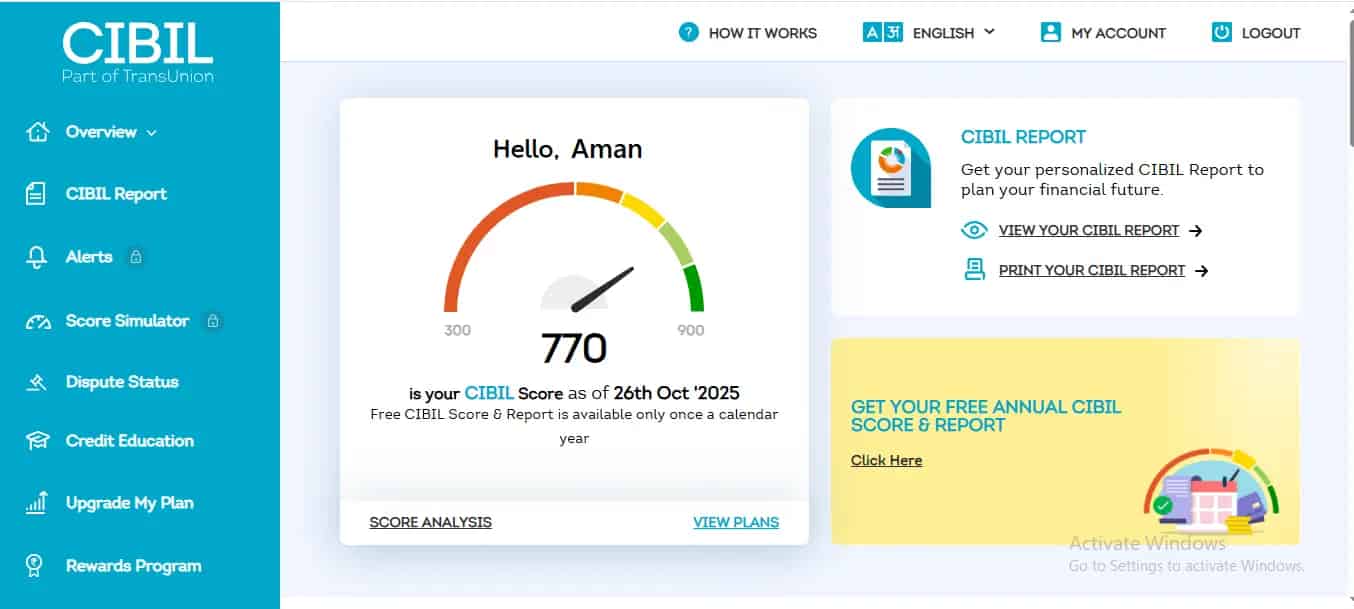
Under this, you'll see two options: View Your CIBIL Report, and Print Your CIBIL Report. Click Print Your CIBIL Report.
Step 7: Save your report as PDF
A new tab will open.
You may see the print window appear directly. If it doesn't come up on its own, use your browser's Print option, or press Ctrl + P on your keyboard, then choose Save as PDF.
Save the file to your device.
That's it, you now have your complete CIBIL report downloaded as a PDF.
If you're already registered (existing users)
If you've already created an account before, there's no need to register again.
Click Login on the homepage. You'll see two options: login using OTP via mobile, or login using your username and password, where your email usually doubles as the username. OTP verification happens again either way, and you'll see that same Trusted Device confirmation screen. Choose the right option, click Verify and Proceed, and you'll land on the dashboard where the steps to download your report are exactly the same as before.
What to do after downloading your report
Once you've got the report in hand, don't just file it away, go through it properly. Our guide on how to read your CIBIL report and understand every section walks through exactly what to check, from your personal details down to every loan and card entry, your payment history, and anything that looks off or unfamiliar. Give this at least fifteen minutes rather than skimming it in thirty seconds, the whole point of pulling the report is to actually read it.
If you do spot an error, we've covered two ways to get it corrected: the standard dispute process inside your CIBIL account, or, if that route doesn't work for your situation, the online complaint method that doesn't even require login.
You can download reports from all four bureaus
A lot of people don't realise this, but you're entitled to a free credit report once a year from CIBIL, Experian, Equifax, and CRIF High Mark. Rather than searching each bureau's website separately, you can find the official links and step-by-step guides for all four in one place:
The page has separate cards for CIBIL, Experian, Equifax, and CRIF High Mark, with the relevant guide for each bureau.
Make this a yearly habit
Downloading your CIBIL report takes less than 10 minutes. But it can save you from a rejected loan, a higher interest rate, and a fair amount of unnecessary stress later.
Make it a habit to check your credit report once every year. It keeps you aware, prepared, and genuinely in control of your credit profile.
Frequently Asked Questions
Is it free to download a CIBIL report?
It's genuinely free, CIBIL is required to give every individual one full report per year at no cost. What often confuses people is that CIBIL's own site also pushes paid subscription plans with extra monitoring features alongside the free option. You don't need any of that just to download your report, the free version through registration is the complete report, not a stripped-down preview.
How many times can I download my free CIBIL report in a year?
Once every twelve months is what you're entitled to for free. If you need to check again sooner, say, right before a loan application, CIBIL does offer paid plans for additional pulls, but for a routine yearly check, the free option is all most people ever need.
What happens if I mistype something while registering, like my mobile number or PAN?
This is exactly why Step 2 is the one to slow down on. Since your registration details effectively become your CIBIL login identity, a typo here isn't a quick fix later, you'll likely need to reach out to CIBIL support directly with proof documents to get it corrected. It's genuinely easier to spend an extra minute checking everything before hitting Accept and Continue than to sort it out afterward.
Can I download my report without creating a CIBIL account?
Not for the full report, registration is a required step, since CIBIL needs to verify your identity before releasing your data. If you're specifically dealing with a report error rather than trying to download a fresh one, we've separately covered an online complaint method that doesn't require a login, but that's for raising a dispute, not for pulling the report itself.
I spotted something wrong in my report after downloading it, what's the actual next step?
Start with our guide on reading your CIBIL report section by section to confirm exactly what looks off and why. Once you've pinned it down, the standard dispute process inside your CIBIL account is the usual route, though if your situation doesn't fit neatly into that flow, the login-free online complaint option is worth trying instead.
Should I bother downloading reports from Experian, Equifax, and CRIF Highmark too, or is CIBIL enough?
Worth doing all four. Lenders don't all report to or pull from the same bureau, so an error can exist on one report and not another, a clean CIBIL report doesn't guarantee your Experian or CRIF Highmark report looks the same. Since all four are free once a year, there's little reason to check only one.