How to Raise a CIBIL Dispute for Report Errors (2026 Guide)

Found something wrong in your CIBIL report? Maybe a loan that isn't even yours, or a payment showing "late" when you paid it right on time, or an old closed account that still shows as active. Take a breath, this happens to a lot of people, more than you'd think. Many people go through this exact panic, and it's almost always fixable.
The tricky part isn't the error itself. It's not knowing how the correction actually works. And that confusion is exactly why so many people end up paying agents hundreds or thousands of rupees for something they could easily do on their own, sitting at home, for free. Yes, the entire CIBIL dispute process is completely free when done through the official website.
In this guide, we'll walk through the whole process step by step: how to spot the error, how to raise the dispute correctly, what happens behind the scenes after you submit it, how long it usually takes, and what your options are if the issue doesn't get sorted. Screen by screen, just like you'll see it in real life.
Why Bother Fixing CIBIL Errors At All?
Your CIBIL report isn't just a number sitting somewhere in the background. It quietly decides whether your loan gets approved, what interest rate a bank offers you, your credit card limit, and how smoothly your bank verification goes. One wrong entry, even a small one, is enough to pull your score down or get a loan application rejected for no real reason.
And here's the thing nobody tells you upfront: these errors don't fix themselves. Nobody at CIBIL is sitting there checking your file for mistakes on their own. The system only moves once you raise a dispute and the concerned lender confirms the correction.
What Kind of Errors Do People Usually Find?
Before starting the dispute process, be very clear about what exactly is wrong. If you're trying to figure out how to fix CIBIL score errors, start by identifying the exact issue. The most common ones are:
- A loan account that simply doesn't belong to you
- Payment history wrongly marked as late
- A loan you've already closed still showing as "active"
- Outstanding balance that's incorrect
- The same loan appearing twice (duplicate entry)
- Wrong personal details, name, DOB, and so on
- An account tagged as "written off" even though you closed it properly
Know the exact account, the exact field, and what it should actually say instead. This clarity will save you a lot of back and forth later. If you're not sure where to look for these in the first place, our guide on how to read your CIBIL report and understand every section walks through every field, so you know exactly what "wrong" actually looks like on the page.
Alright, let's get into the actual process.
Step 1: Get Your Latest CIBIL Report
Start with a fresh report, don't work off an old one. You're allowed one free CIBIL report every year, so make use of it. If you haven't done this before, check our guide on downloading your free CIBIL report for the exact steps.
Once you have it, go through your personal details, account details, and payment history carefully, and take a screenshot or write down exactly what's wrong. You'll need this later.
Step 2: Understand How the Dispute System Actually Works
Here's something a lot of people get wrong. CIBIL cannot directly edit or change your report on its own. Many people assume they can at first, and it changes how you approach the whole thing once you realise otherwise.
What actually happens is this: you raise the dispute, CIBIL passes it on to the lender, that is, the bank or NBFC that reported the entry. The lender checks its own records, sends its response back, and CIBIL updates your report based on what the lender says. So the final call genuinely sits with the lender, not CIBIL. Your only job at this stage is making sure the dispute is filled in correctly and clearly.
Step 3: Find the "Raise a Dispute" Option
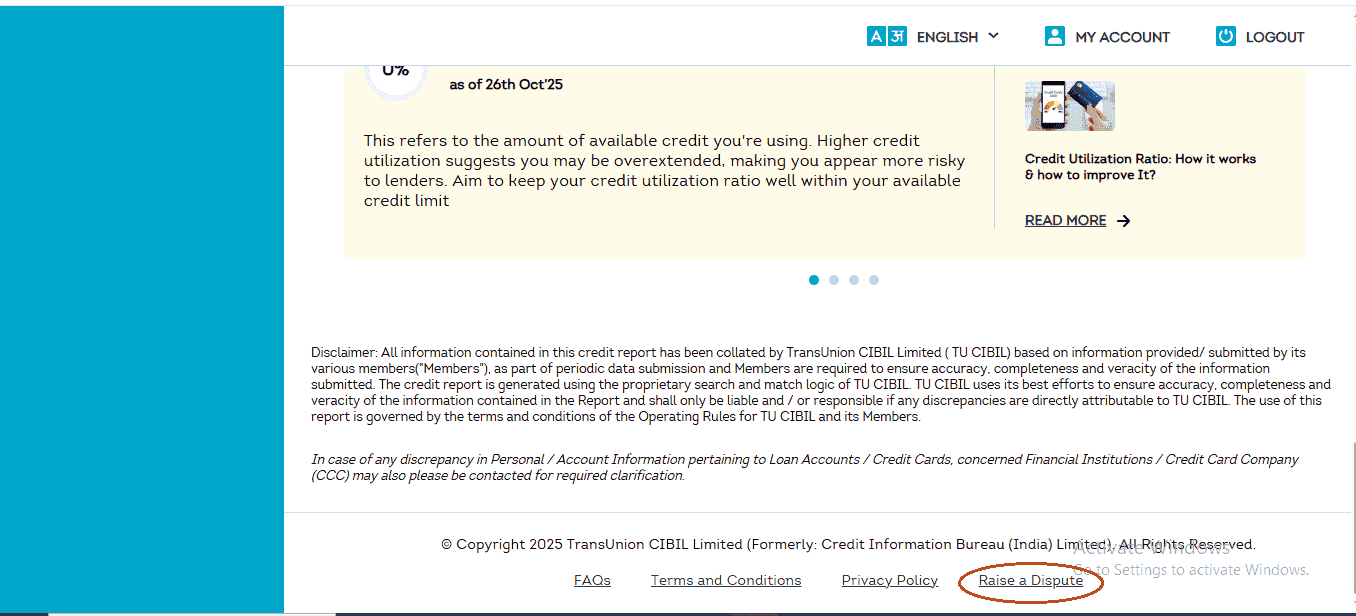
Log into your CIBIL account and open your report or dashboard. On the left-hand menu, click on "CIBIL Report." Now scroll, and keep scrolling, past your score, past the account summary, right down to the bottom of the page.
Near the footer, you'll find a link that simply says "Raise a Dispute." It's easy to miss the first time since it's tucked away at the bottom, but that's the entry point for every correction, and the starting point of the CIBIL report correction online process.
Step 4: Pick What You Want to Fix
Clicking that link takes you into the Dispute Center. At the top, there's a heading that says:
"Choose a part of your report you would like to dispute"
Below it, you'll see different categories:
- Account Section: wrong balances, incorrect payment history, wrong loan status
- Personal Information: mistakes in name, date of birth, gender, or PAN
- Employment Information: wrong job title or income details
- Credit Application History: errors in your loan or card applications
- Contact Information: wrong address, phone number, or email
- Other Information: anything that doesn't fit the categories above
In most cases, the problem lies in either the Account Section, Personal Information, or Contact Information. Pick whichever one matches your issue.
Fixing Loan and Credit Card Errors (Account Section)
Since account-related mistakes are the most common ones, let's go through this one in detail.
A. Pick a Problem Description
Click Account Section, and you'll see small boxes with pre-written issue descriptions, something like "Recent payment in loan account not reflecting in my CIBIL report." Don't stress if none of them exactly match your problem, just pick the closest one.
Under each box, there's a green "Find Solution" button. Click it to move ahead.
B. Get to the Raise a Dispute Button
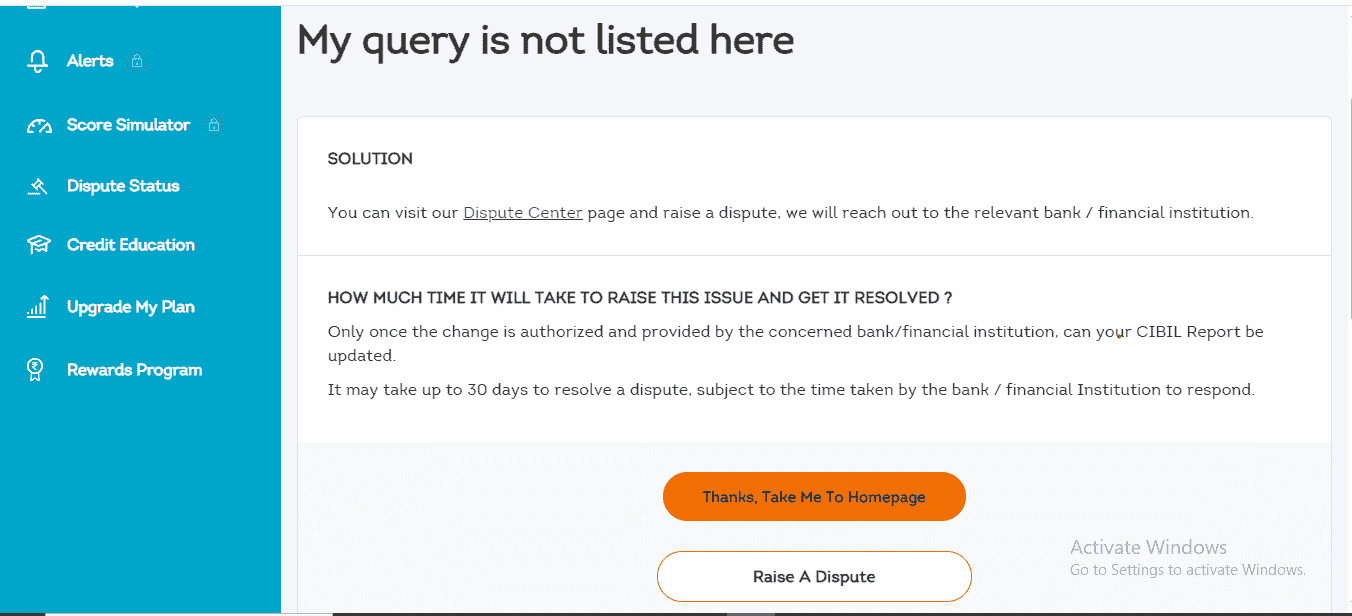
This takes you to a page with some explanation. Scroll down till you find a big button that says "Raise A Dispute." Click it, this is what actually opens the dispute form.
Step 5: The Screen After You Click Raise Dispute
Once you click through, you will land on a screen that guides you to the next stage of the process. Nothing to fill in here yet, just follow the prompt to continue.
Step 6: Correcting the Actual Account Details
This is where the real correction happens, so take your time here.
You'll see a list of every loan and credit card on your CIBIL record. Find the one with the error. Next to the account name, there's a small arrow or a plus (+) sign, click it to expand and see the full details.
[Image: CIBIL credit report account details showing error fields, alt="fix CIBIL score errors - account details form"]
This is the section where you'll spend most of your time, so let's break it down properly.
A. Two Quick Checkboxes
Right at the top of the expanded view, there are two checkboxes:
- Account reflects multiple times, tick this if the loan is showing up more than once
- Account does not belong to me, tick this if the account simply isn't yours
If either applies, just tick the box, no need to edit anything further for that account.
B. Editing the Account Details Section
Scroll to ACCOUNT DETAILS. Here you can edit fields like Current Balance, Amount Overdue, Date Closed, and Credit Facility Status. Click on whichever field is wrong, and a small box opens where you can type in the correct value.
For instance, if the status shows "Settled" but you actually paid the full loan amount, change it to "Clear Existing Status." This removes the settled remark from your file.
C. Fixing Payment History (This One Matters a Lot)
Next to Account Details, there's a tab called PAYMENT STATUS. Click it.
You'll see your month-by-month payment record using short codes:
- 000: Paid on time
- 030: 30 days late
- 060: 60 days late
- SMA: Special Mention Account
- DBT: Doubtful
If a particular month is wrongly marked late, click on that code and change it to 000. You can correct as many months as needed.
D. The Other Information Tab
There's also an OTHER INFORMATION tab. This usually holds details about write-offs or special reporting conditions. If that's where your issue lies, you can edit it here too.
E. Move to the Next Account
Once you're done correcting an account, scroll down and hit Continue. Got more than one account with errors? Repeat the same steps for each before moving forward.
F. Review and Submit
After clicking Continue, you will land on the Review & Submit Dispute page. It shows a summary of everything you've corrected. Go through it carefully, and once you're satisfied, click Proceed to next step.
Step 7: The RBI Identification and Bank Details Step
No matter which section you were fixing, accounts, personal info, or contact details, everyone lands on this same page eventually:
"Update Your Account Information"
A lot of people get thrown off here, wondering why a credit report correction needs bank details. Here's the reason: this step exists under consumer-protection guidelines. If, down the line, a bank is asked to pay compensation because of a wrong entry or a delayed response, this is how that amount reaches you securely.
And there's real money attached to this. As per an RBI circular dated October 26, 2023, if your dispute is not resolved within 30 calendar days of filing, you are entitled to compensation of ₹100 for every day of delay after that. The 30 days is split between the lender and CIBIL: the bank or NBFC gets 21 days to send the correction, and CIBIL gets the remaining 9 days to update your report. If either side misses their part and the total crosses 30 days, the compensation kicks in automatically, you don't need to ask for it separately. This is exactly why the bank account details you enter here matter, that's where the compensation amount would be credited if it becomes due.
Fill this section carefully.
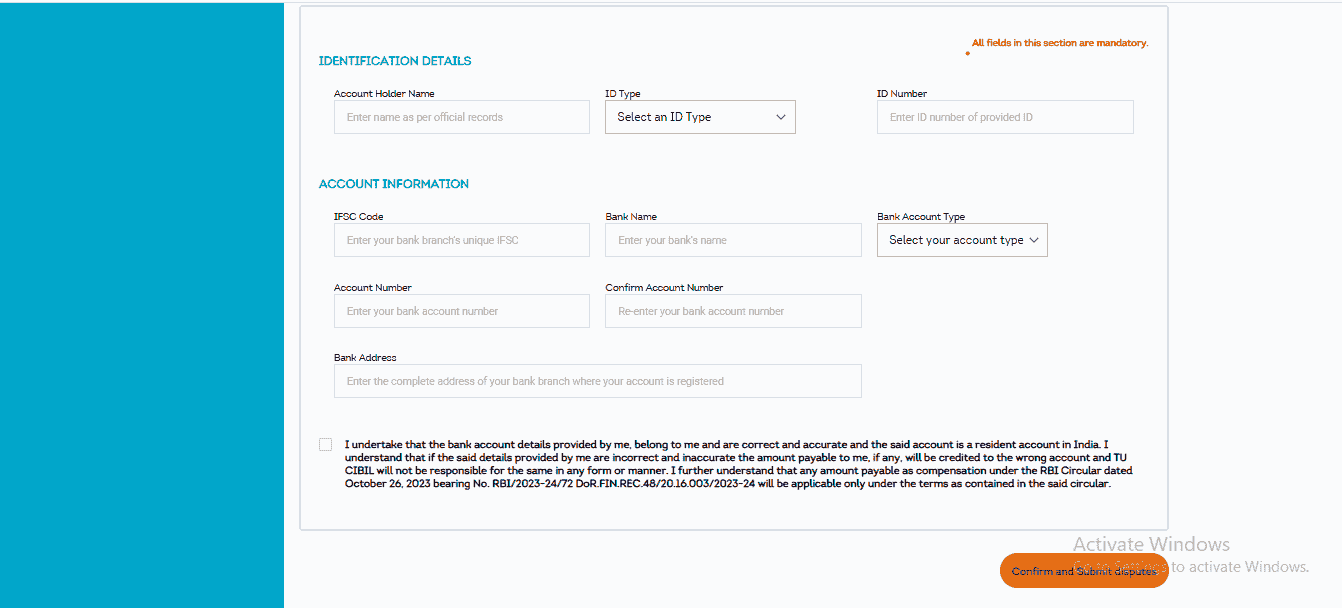
You'll need your full name, ID type and number under Identification Details, and then your IFSC code, bank name, account type, account number entered twice to confirm, and branch address under Account Information. Double-check your IFSC code and account number here, a small typo can create unnecessary delays.
Confirm and Submit
Once everything's filled in, click "Confirm and Submit Disputes."
You'll land on a confirmation screen where a Dispute ID gets generated, something that looks like CDS12345678910.
Save this ID somewhere safe. Screenshot it, or write it down. You may need it for CIBIL dispute ID tracking later.
That's it, your dispute is officially filed.
What Happens After You Submit the Dispute? (CIBIL Dispute Resolution Time Explained)
Once you have your Dispute ID, your part is mostly done. From here, it's between CIBIL and the bank or lender that reported the entry.
As mentioned earlier, CIBIL can't change your data directly. Your dispute goes straight to the bank, NBFC, or card company that originally reported it, and only they can confirm whether a change is needed. The bank has up to 30 days to check its records, review what you've disputed, and respond to CIBIL. This 30-day window is standard across every dispute, not just yours. It's the main factor behind the overall CIBIL dispute resolution time, so pacing your expectations around it saves a lot of unnecessary worry.
What Can Happen Next: Three Outcomes
-
The bank agrees with you. They confirm the earlier entry was wrong, send updated details to CIBIL, and your report gets corrected. You'll get an email or SMS once it's done.
-
The bank disagrees. If they check their records and stand by the original entry, no change is made, the dispute gets closed, and a rejection reason is recorded. At this stage, it helps to contact the bank directly with proof, statements, receipts, anything relevant. Our guide on writing a professional email for CIBIL correction has a ready format for exactly this situation.
-
The bank doesn't respond in time. If 30 days pass with no response, the disputed entry can be temporarily removed from your report. It stays off until the lender comes back with proper justification to re-report it. This rule exists purely to protect you from being stuck waiting indefinitely.
How to Check Your CIBIL Dispute Status
Once you get a resolution message, log back into your CIBIL account, pull a fresh copy of your report, and go straight to the section you disputed to confirm the change has actually gone through. Don't take the SMS or email at face value, always verify your CIBIL dispute status yourself before assuming it's closed.
A Few Practical Tips
Patience genuinely matters here, the entire process can take close to 30 days, and it costs nothing, since this is a completely free process when raised through the official website. Make it a yearly habit to check your report, since catching problems early beats discovering them during a loan application. If a dispute gets rejected unfairly, reach out to the bank's grievance officer first, and escalate to the RBI Ombudsman if that doesn't help. And if the standard route doesn't fit your situation, an older report, a copy from a third-party platform, or a request that simply went nowhere, CIBIL also has an online complaint method that doesn't require login, which gives you more room to explain your case.
In Short
Once you've been through this process one time, it stops feeling confusing or intimidating. Your CIBIL report is basically a mirror of your financial habits, and when it shows something wrong, it doesn't just hurt your score, it changes how banks see you.
By handling the dispute yourself instead of paying an agent, you're not just saving money, you're actually understanding how the system works. And that's something you'll be able to use again, confidently, any time you need to.
Frequently Asked Questions
Is the CIBIL dispute process actually free, or is there a fee hidden somewhere in the flow?
It's genuinely free when raised through the official CIBIL website, there's no step in this process that asks for payment. If you've come across a paid "agent" offering to do this for you, they're charging for something you can do yourself in the same amount of time it'd take to explain your case to them.
Why does CIBIL ask for my bank account and IFSC details just to fix a report error?
This step exists under consumer-protection rules, not because CIBIL needs your banking details to process the correction itself. If a bank ends up owing you compensation later, for example, over a wrong entry or a delayed response, this is the information used to actually get that amount to you. It's worth filling in carefully, since a typo in the IFSC code or account number here can cause its own delays.
How long does a CIBIL dispute actually take to get resolved?
Budget for close to 30 days. That window exists because the lender who reported the disputed entry, not CIBIL, has up to 30 days to check their own records and respond. It's the same timeline for every dispute, not something that varies much case to case.
What happens if the bank simply doesn't respond within that 30-day window?
The disputed entry gets temporarily removed from your report. It stays off until the lender eventually comes back with proper justification to re-add it. This exists specifically so you're not left waiting indefinitely with no resolution either way.
What if I raise a dispute and the bank disagrees with me?
Then the entry stays as it was, the dispute gets closed, and a rejection reason is logged. This isn't necessarily the end of the road, it's worth reaching out to the bank directly with supporting proof like statements or receipts, and our guide on writing a professional correction email covers exactly this situation.
I got an SMS saying my dispute was resolved, can I just trust that and move on?
Better not to. Log back into your CIBIL account, pull a fresh report, and check the actual section you disputed yourself. An SMS or email confirming resolution is a signal, not proof, the only way to know for certain is to see the correction reflected in the report itself.