How to Send Professional Emails for CIBIL Correction

Writing a formal email about a CIBIL correction sounds easy, until you actually sit down to write it. Even people who write emails every day for their job get confused when it is about their own credit report. It is not that anyone forgets how to write an email. It is just that money-related letters carry more weight, and if the tone or format goes wrong, your case may not get taken seriously.
This guide will show you exactly how to write and send this email, whether you are using a laptop or doing it on your phone while standing in a queue.
Why Email Is Better Than a Phone Call
A phone call to customer care feels quicker at that moment. But once you put the phone down, you have nothing to show for it. No proof, no record, nothing to point to if the person forgets or does not note it down properly. Email solves this problem. It has a date and time, it is in writing, and if you ever need to escalate the matter, this written proof becomes the most useful thing you have.
After sending many such emails, one thing is clear: a clear, well-organised email gets a faster reply than a vague one. This is simply because the person reading it does not have to struggle to understand your problem.
Collect Your Documents First
Before you open your email app, gather your CIBIL report with the mistake marked, any loan statements or payment proof related to that account, your ID details, and copies of anything you have already sent about this problem. If you skip this step, you will write two lines, then stop to search your phone gallery for a screenshot, and lose track of what you were writing. Keeping everything ready in one folder first makes the actual writing much smoother.
Quick Checklist: What Every Correction Email Must State
Before you start writing, it helps to know what the email must cover. Every CIBIL correction email should clearly state:
| What Your Email Should State | Why It Matters |
|---|---|
| The wrong information | Exactly what is showing on your report now, and where |
| The correct information | What it should say instead |
| The account/report reference | Your loan account number and CIBIL Control Number, so the reader can find the exact entry |
| Why the information is wrong | A clear, factual reason, not an emotional one |
| The correction you want | The exact action you want taken, stated directly |
| The supporting documents attached | What proof is included, so nothing is missed |
Keep this table open in another tab while you write. Checking against it catches things you would otherwise forget.
Writing the Email on a Computer
Open your usual email account in the browser, and use your existing, already-registered email ID, not a new one. A new email address may feel like a fresh start, but it actually breaks the link between all your past communication on this issue.
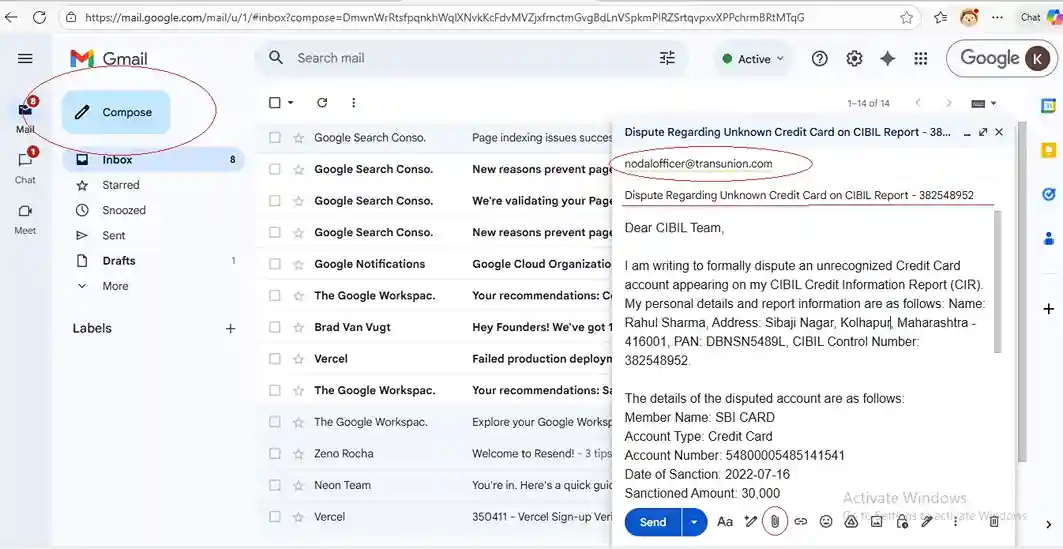
Click Compose to start a new message.
In the recipient field, add both the credit bureau and the lender concerned. For CIBIL, that is:
nodalofficer@transunion.com, escalationdesk@transunion.com
For the lender's side, check their official website for the correct grievance email address. Or save time and get it from our Email List, which already has these listed.
The subject line matters more than people think. A vague subject line often gets ignored without anyone even opening the email. A direct subject works much better:
Dispute Regarding Credit Report Error - [Your Name] - [Loan Account Number]
This tells the reader exactly what is inside before they even click.
In the body of the email, start formally, then come to the point quickly: what is wrong, what it should say instead, and what proof you have attached. If putting this into words feels difficult, our Drafting Tool can write a properly formatted email for you in a few minutes. Keep the tone factual. Many people become frustrated while writing this and let it show, but a calm, specific email is read differently from an angry one, even when the problem is the same. Include your full name, date of birth, PAN number, and the loan account number under dispute.
Attach every supporting document, labelled clearly, preferably as PDFs. Read the whole email once more to check for mistakes, confirm all attachments are added, then send, and keep a copy in your sent folder. You will need it later.
Writing the Email on Mobile
The same process works well on a phone too, with a few small changes.
Open Gmail or your phone's Mail app, tap Compose, and type the recipient addresses carefully. Mobile keyboards can create typing mistakes you will not notice until after you send. Use the same subject line format as above.
Do not let the phone make you write casually. It is easy to start writing like you are texting a friend, simply because that is the habit a phone keyboard creates, and you may need to go back and correct it. A letter about money matters deserves the same serious tone no matter which screen you use. Keep the paragraphs short so it is easy to read, but do not leave out any important detail just to save time.
To attach documents, tap the attachment icon and choose from Google Drive, your photo gallery, or wherever the files are saved. Let each file finish uploading fully before adding the next one.
Read through the whole email once more before sending, check that every attachment has been added, then send and wait for the delivery confirmation.
What Actually Makes These Emails Work
A few things clearly separate the emails that get a quick reply from the ones that get ignored: sticking to facts instead of emotional words, being specific instead of writing something long and unclear, and always including complete ID details along with the exact account number in question. If seven working days pass with no reply, send one polite follow-up that refers to the original email instead of starting over. Keep every sent email and every reply in one separate folder. If this takes time to resolve, you will be glad you kept them.
Mistakes to Avoid
A few common mistakes slow this process down the most: no proper subject line, forgetting to attach documents, writing in a casual or short-form style, leaving out ID details, or sending the same email again and again out of frustration. That last mistake especially does not help. Sending it again does not speed things up, it only adds more messages to a thread that someone still has to read through later.
After You Send the Email
Watch your inbox. Most institutions reply somewhere between seven and ten working days. If that time passes, send a calm, professional follow-up that refers to the earlier thread, not a fresh explanation from the start.
In the end, fixing your credit report comes down to writing clearly and keeping a record. Once you have done this one time, it stops feeling difficult. It is just one properly written email, sent to the right people, with the right details attached.
Frequently Asked Questions
Should I make a new email ID for this, or use the one I already have?
Use your existing, already-registered email ID. A new one may feel cleaner, but it actually works against you. It breaks the link between all your communication on this issue, which matters if the case needs to be escalated later.
How long should I wait before sending a follow-up if I get no reply?
Wait seven to ten working days. If that time passes with no reply, send one calm, professional follow-up that refers to your original email instead of explaining everything again from the start.
Does it matter whether I send this from my phone or my computer?
Not really, the process works the same way either way. What matters is that your tone stays the same no matter which device you use. It is easy to become casual while typing on a phone, but a letter about money matters deserves the same professional treatment whether you are on a laptop or typing on your phone.
What if I don't know the lender's official grievance email address?
Check their official website first. If you want to save time, our Email List page already has these listed for quick reference, so you are not guessing at an address or risking a mistake in a domain name you are unsure of.
Is it okay to send the same email again and again if I don't get a reply?
No, avoid doing this. Sending the same email repeatedly out of frustration usually adds delay instead of removing it. One polite follow-up, referring to the original email, after seven to ten working days works much better than several repeated emails sent close together.
What is the biggest thing that slows down these emails?
Being unclear, more than anything else. An email that only says "this is wrong" without stating the wrong information, what it should say instead, the account reference, and the exact correction being requested gives the reader nothing solid to act on. Going through the checklist above before sending is the easiest way to avoid this problem.