How to Download Your Free Experian Credit Report (Step-by-Step)

Most people in India know their CIBIL score by heart. Ask them about their Experian report though, and you'll usually get a blank look, most don't even realise it exists, let alone that they're entitled to download it for free, once every year. Ask this question to enough people and the reaction is almost always the same slight surprise.
And it's not some watered-down version of your credit profile either. It carries the same kind of detail banks actually look at before approving a loan or a credit card: your active and closed accounts, your payment history, your personal details, and your recent credit enquiries. If there's a mistake sitting anywhere in your credit profile, this report will show it just as clearly as your CIBIL one does.
The registration process can look a little technical the first time you see it, but it's genuinely straightforward once you know which screen leads to which. This guide takes you through it exactly as you'll encounter it, screen by screen, the same sequence to follow every time.
Step 1: Open Experian and Click "Free Credit Score"
Head to the Experian website. Right at the top, you'll spot a button labelled Free Credit Score, that's your starting point. Click it to move into the consumer registration and login area.

Step 2: On the Login Page, Click Register
You'll land on a login screen next. Since this is your first time here, there's nothing to log into yet, just click Register Now instead.
On the following page, Experian asks for your mobile number. Try to use the same number that's already linked to your bank accounts and credit cards, since that's what Experian uses to verify who you are.
Enter it, then click Send OTP.
Step 3: OTP Verification
You'll receive an OTP on that mobile number. Type it in and click Verify to move ahead.
This step is just Experian confirming the number genuinely belongs to you before it lets your account creation proceed.
Step 4: Create Your Password
Next, you'll see a welcome screen for Experian D2C. This is where you set up a password for your new account.
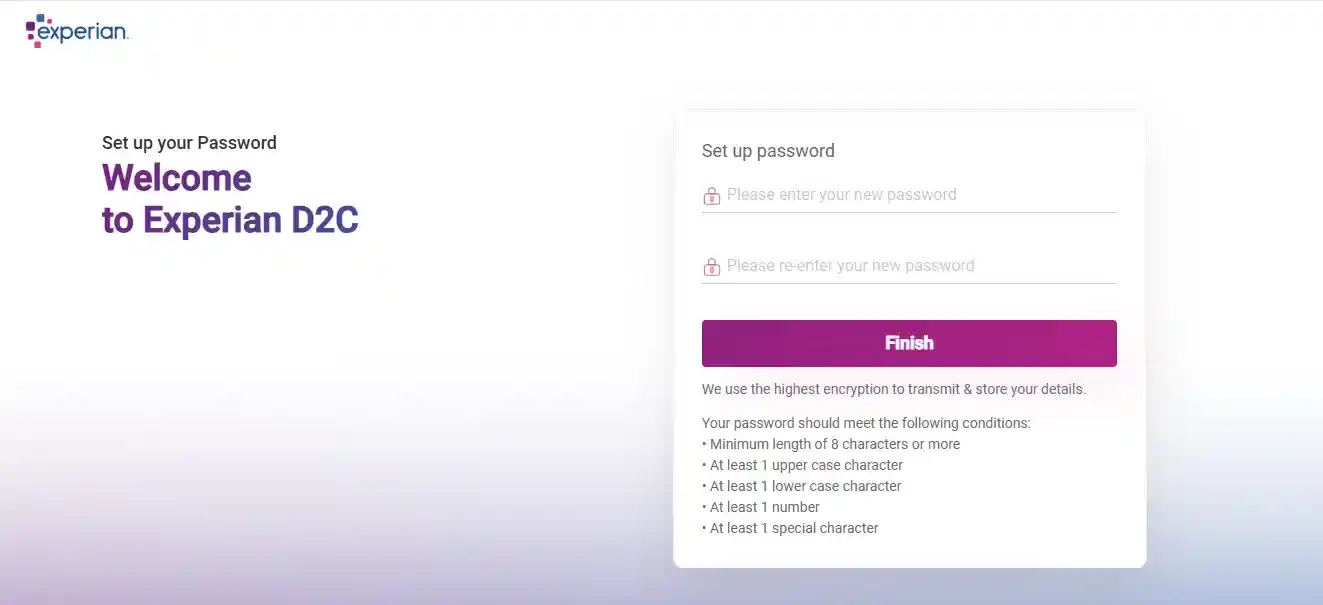
Experian lays out the password rules clearly on this screen. Yours needs to have:
- At least 8 characters
- One uppercase letter
- One lowercase letter
- A number
- A special character
Once it's set, click Finish.
Step 5: Select the Free Plan (₹0)
This is genuinely where a lot of people get thrown off. Experian shows you two plans side by side, one paid, one free, and it's easy to assume you need the paid one to get your report. You don't.
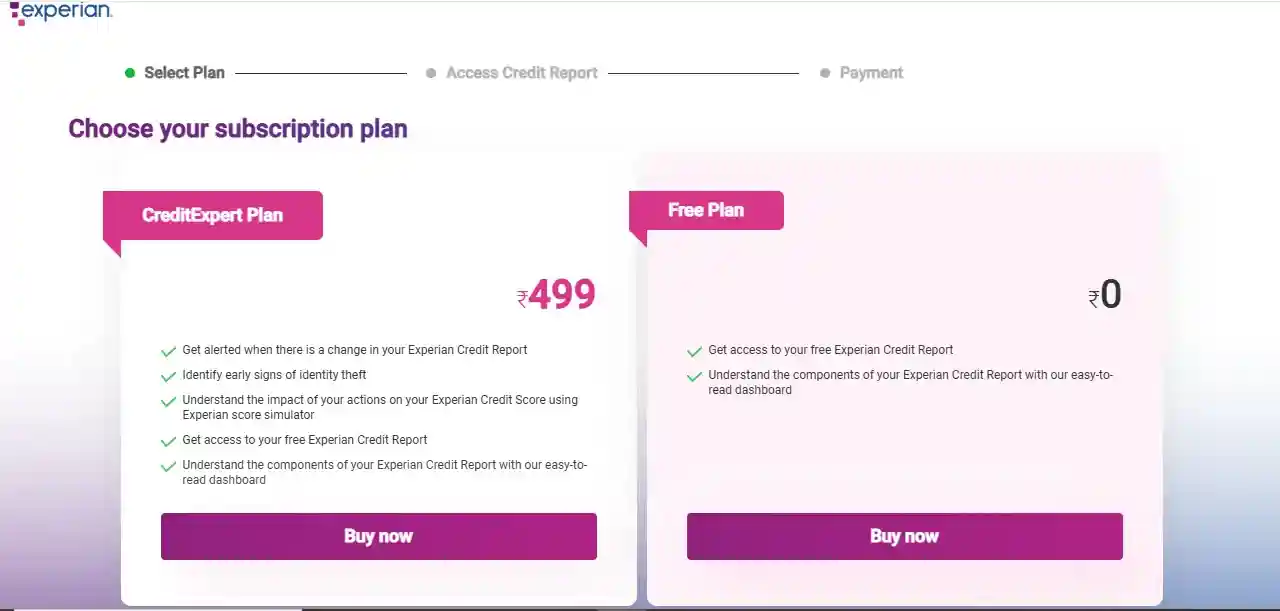
Just pick the Free Plan (₹0).
Click Buy Now under that free plan, yes, it says "Buy," but nothing gets charged here.
Step 6: Enter Details Exactly as per Your Credit Records
This is the part where you genuinely need to slow down. Experian asks for personal details, and these need to match your credit records precisely, not roughly, precisely.
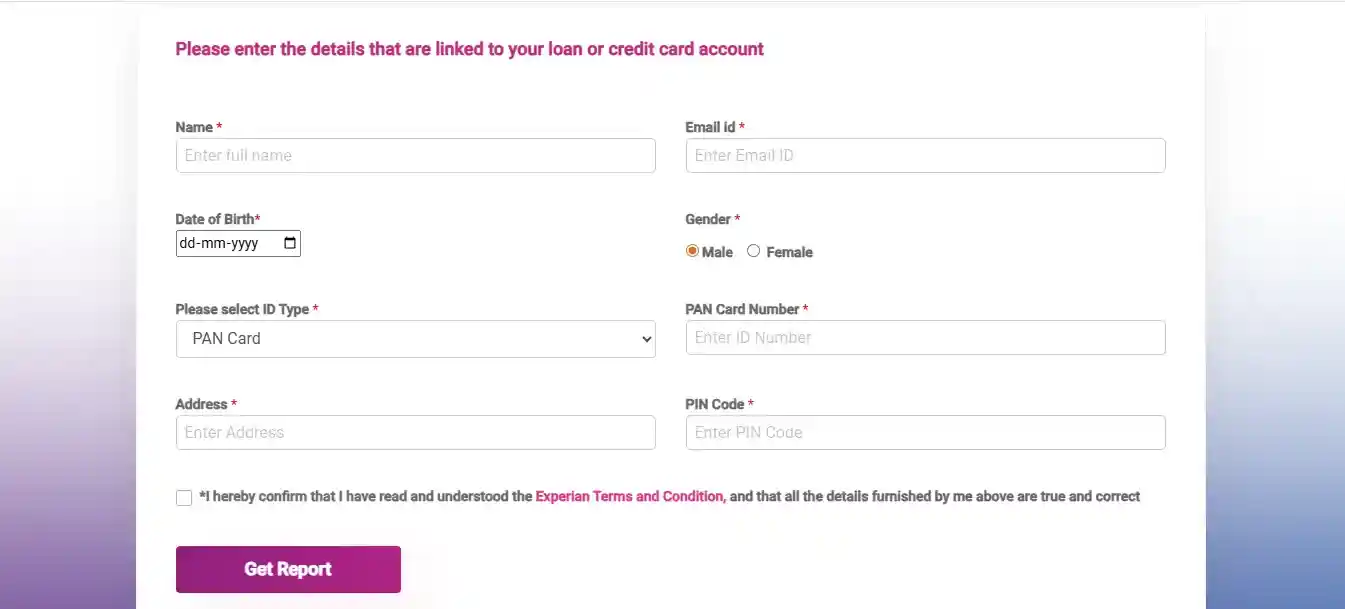
You'll be asked to enter:
- Your full name
- Email ID
- Date of birth
- Gender
- PAN card number
- Address and PIN code
Even a small mismatch between what you type and what's on file with your bank can stop the report from opening properly. Go through each field carefully, tick the declaration checkbox, and click Get Report.
Step 7: You Reach the Experian Dashboard
Once you submit the form, Experian verifies everything and takes you straight to your dashboard.
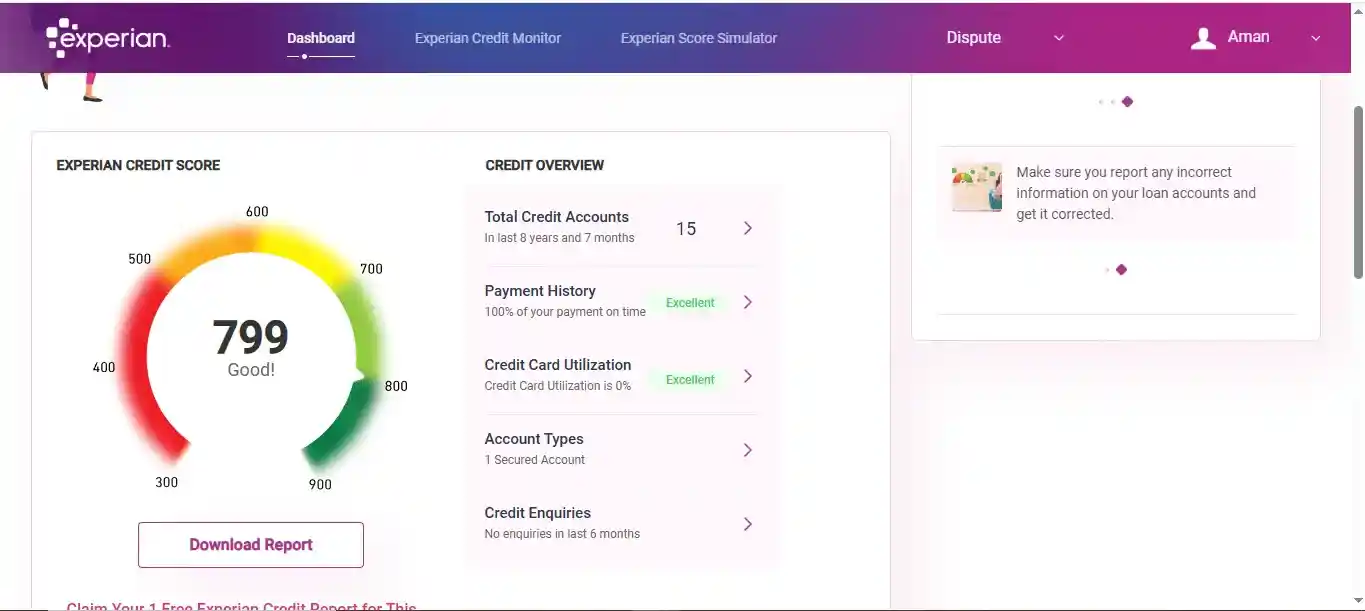
From here you can see your Experian credit score, a summary of your credit profile, and a button that says Download Report.
Click it.
Step 8: Download the Report as PDF
Clicking Download Report starts the PDF download automatically to your device.
You'll find it in your downloads folder, ready to save wherever you'll remember it later.
If for some reason the download doesn't kick off on its own, fall back on your browser's Print option, press Ctrl + P and choose Save as PDF instead of an actual printer.
Already Have an Experian Account?
If you've been through this before, there's no need to register again. Just log in using either your mobile OTP or your email and password. Once verified, you'll land straight on the dashboard, ready to download your report.
Why Bother Checking Your Experian Report At All
This report captures your full credit behaviour over time, and banks genuinely don't lean on just one bureau when reviewing your application, Experian data often gets checked right alongside CIBIL. Some people assume a clean CIBIL report means they're fully covered, only to find something entirely different sitting in their Experian file. An error unnoticed here can quietly affect your approval odds, exactly the same way a CIBIL error would.
Don't Stop at Just One Bureau
Experian is just one of India's four credit bureaus, and you're entitled to a free report from each of them, once a year.
We've put together the official links to all of them in one place:
That way you can check your full credit profile across CIBIL, Experian, Equifax, and CRIF High Mark without hunting down four separate websites.
Final Thought
Getting your Experian report isn't complicated once you know the sequence, a mobile number, your PAN details, and a few careful minutes filling in the form is really all it takes.
The first time you actually see it, you'll probably understand why it's worth checking regularly. It shows you exactly what a lender would see, giving you a real chance to catch and fix mistakes before they end up costing you a loan approval.
Frequently Asked Questions
Does it matter which mobile number I register with?
Yes, use the same number that's already linked to your bank accounts and credit cards. Experian uses this to verify your identity and match you to your existing credit history, so a different number can complicate that matching process.
I see a paid plan during signup, do I actually need to pay to get my report?
No. Experian shows a paid plan alongside the free one, and it's easy to assume the paid option is required, but the Free Plan (₹0) gets you the report at no cost. The "Buy Now" button under it doesn't charge anything.
What happens if my personal details don't exactly match what's on file with my bank?
Even a small mismatch, a spelling difference, a formatting difference in your date of birth, can stop the report from opening properly. It's worth going through each field carefully during registration rather than rushing through it.
I've already registered with Experian before, do I need to sign up again?
No. Just log in using either your mobile OTP or your email and password, and you'll land straight on your dashboard, ready to download this year's report.
Is the Experian report genuinely free every year, or are there limits I should know about?
It's free once every year, directly through Experian's own site. No agent, no hidden charge, no workaround needed, the Free Plan option covers the complete report, not a limited preview.
Why should I bother checking Experian if I already check my CIBIL report regularly?
Because banks don't rely on just one bureau, Experian data often gets checked right alongside CIBIL, especially by fintechs and digital lenders. An error sitting only on your Experian file would never show up if CIBIL is the only report you ever look at.