How to Get Your Free Equifax Credit Report Online in India

Ask most people in India about their CIBIL score, and they'll tell you right away. Ask about their Equifax report, and you'll usually get silence. That silence is a mistake.
Equifax is one of India's four authorised credit bureaus. Banks genuinely use its data when approving loans, especially unsecured ones like personal loans, credit cards, and BNPL. If there's an error sitting quietly in your Equifax file and you've never checked it, you might never even find out why an application got rejected. That exact blind spot has cost people an approval they should have easily gotten.
Here's the good part though: Equifax lets you generate one free credit report every year, straight from their official site. No agent, no fee, no workaround needed.
This guide walks through exactly what you'll see on screen, from registration all the way to downloading the PDF, plus what to do if you've already registered before and a few common mistakes worth avoiding.
Why Checking Your Equifax Report Actually Matters
Your credit profile doesn't live in one place. Different banks and NBFCs pull from different bureaus depending on their own policy, so checking your Equifax report specifically can surface errors that never show up on your CIBIL report at all, show you how lenders actually read your repayment behaviour, and confirm your personal details and enquiry history are accurate. It's also one of the more reliable ways to catch an identity-related issue before it becomes a real problem.
If you'd rather check all four bureau reports from one place, we've got that covered too: 👉 Free Report, this links directly to the free report options for every authorised bureau.
Step 1: Visit the Official Equifax India Website
Go to: Equifax
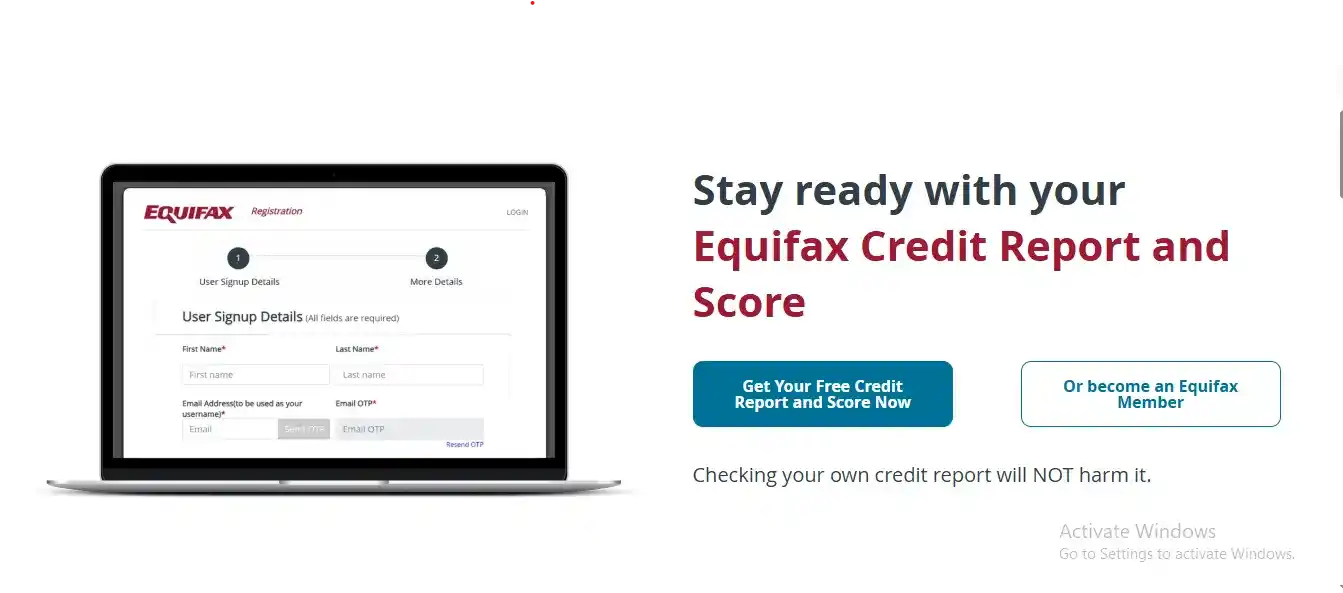
Scroll down a little on the homepage. You'll spot a button that says:
"Get Your Free Credit Report and Score Now"
Click it.
Step 2: Land on the Free Credit Report Portal
This opens a new tab that looks a bit different from the main Equifax website, that's expected, it's Equifax's consumer portal.
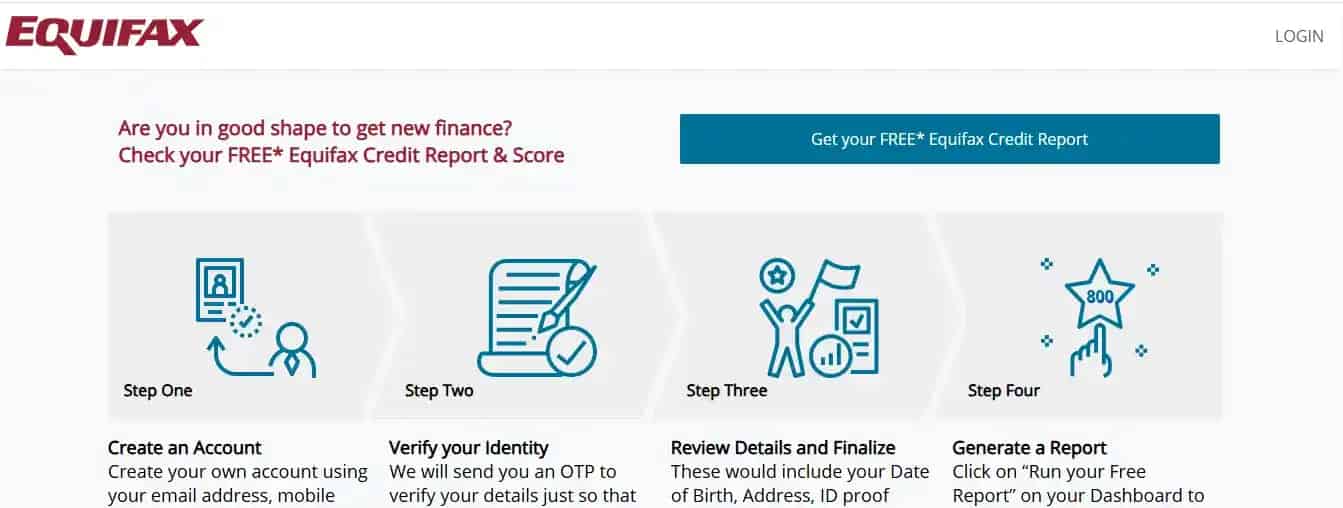
On this page, click:
"Get your FREE Equifax Credit Report"
This takes you into registration.
Step 3: Fill in Your Signup Details
You'll land on a page titled User Signup Details. Every field here matters, mistakes made at this stage are hard to fix once they're in the system, so take your time. Treat this screen like it's the important one, not a formality to click through.
You'll be asked for:
- First Name
- Last Name
- Mobile Number
- Email Address (this becomes your username)
Once you've entered your email, click Send OTP.
Verifying With OTP
The OTP lands in your email (sometimes your mobile too). Enter the Email OTP in the box provided, and use Resend OTP if it hasn't shown up yet.
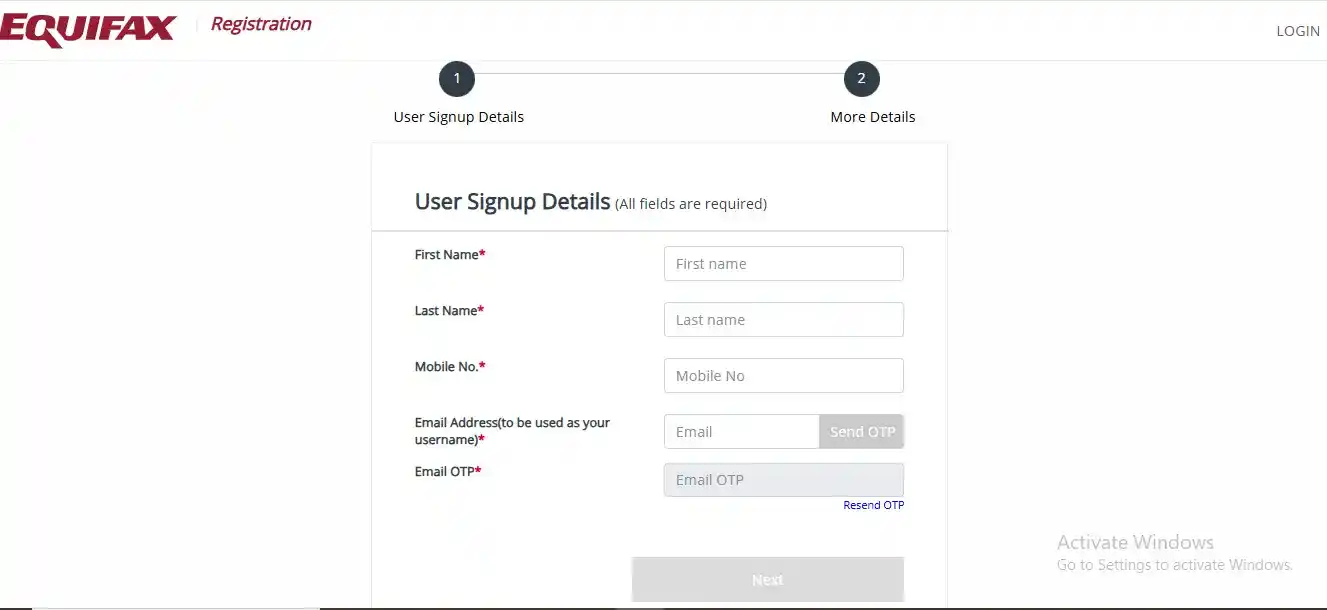
Once verified, click Next.
Step 4: Carefully Fill In More Personal Details
Next is the More Details page, where Equifax checks your identity against what lenders already have on file.
You'll need to enter:
- New Password and Confirm Password
- Date of Birth (DD-MM-YYYY format)
- Gender
- Complete Address
- City and State
- PIN Code
- ID Type (PAN is the most common choice here)
- ID Number
At the bottom, accept the Terms and Conditions, tick the "I am not a robot" checkbox, and click Next.
⚠️ Worth being careful about: whatever you enter here needs to closely match what your bank or lender already has on record. Even a small address spelling difference or a DOB format mismatch can cause trouble later, a single wrong digit in a PIN code has held up someone's verification for days.
Step 5: Registration Complete, Time to Log In
If everything went through cleanly, you'll see:
"Congratulations! Your registration is completed."
Click Login, then sign in using your email ID (as your username) and the password you just set.
You might get asked for another email OTP here, enter it, confirm, and continue.
Once verified, you'll land on the Equifax dashboard.
Step 6: Run Your Free Equifax Credit Report
On the dashboard, look for a section titled:
Consumer Credit Report
Inside it, click:
"RUN A FREE REPORT"
This takes you to a page called My Credit Reports. Click:
"RUN YOUR FIRST FREE CREDIT REPORT"
A confirmation popup will ask if you want to go ahead and generate your free report. Confirm it.
Step 7: Report Generation and Download
Your report generates in a matter of seconds.
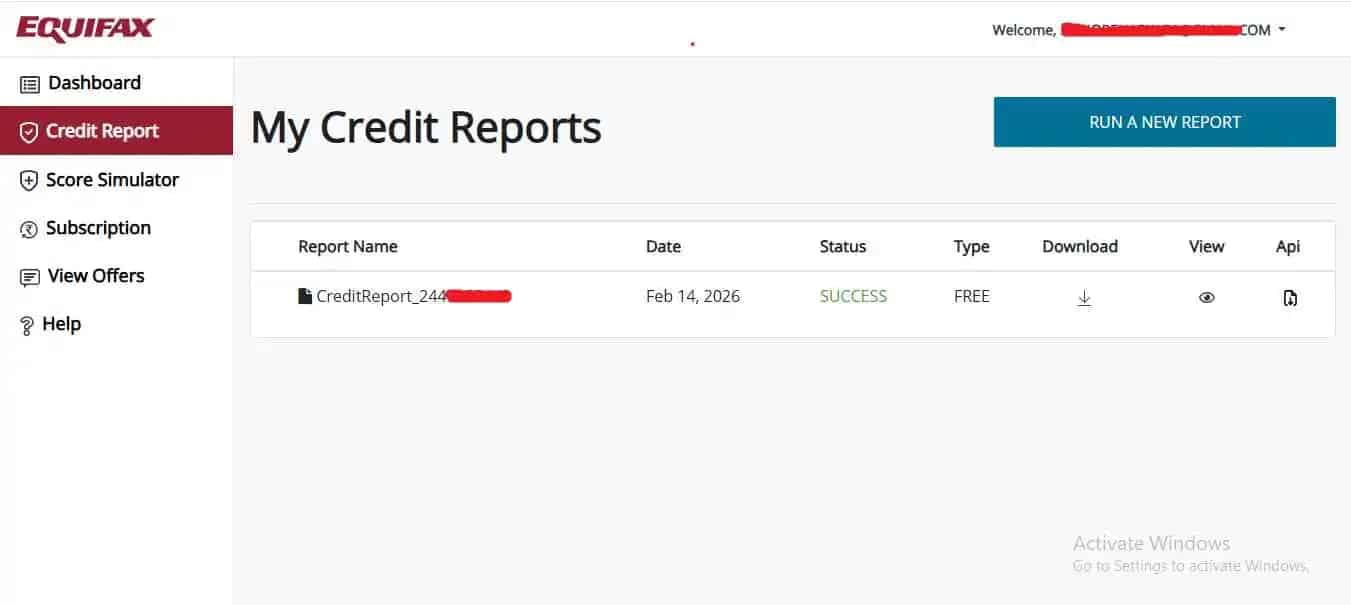
You'll then see a small table with your report's name, the date, its status marked SUCCESS, the type marked FREE, and a download icon sitting next to it.
Click the download icon next to your report.
That's it, your Equifax credit report PDF lands directly on your device. No print workarounds, no browser tricks. Just a straight download.
Already Registered With Equifax?
If you've used Equifax before, there's no need to register again.
Just:
- Head to the Equifax login page
- Enter your registered email and password
- Verify via OTP if prompted
- Go to your dashboard
- Click RUN A FREE REPORT, assuming you're still eligible for this year's free report
If your free quota for the year is already used up, the system will tell you clearly.
A Few Practical Things Worth Knowing
You're allowed one free Equifax report per year, and it's genuinely worth getting your registration details right the first time, since they're hard to change once submitted. Stick to your own email and phone number rather than creating multiple accounts with different ones, doing this thinking it'll help usually just complicates things later. Once you've downloaded the PDF, keep it somewhere you'll actually find it again.
If your report does show something incorrect, Equifax also has a dispute option built into the dashboard for exactly that.
Final Thoughts
Checking your Equifax report isn't optional anymore. It's just basic financial hygiene at this point.
A lot of people fixate on CIBIL and completely ignore the other three bureaus. Lenders don't ignore any of them, though. A clean Equifax report genuinely strengthens your overall profile, while an error sitting there unnoticed can quietly work against you.
Since this report costs nothing to generate, there's really no good reason to skip it.
And if you want one page that links you straight to all four free bureau reports in India, bookmark this: 👉 Free Credit Report
It saves you the hunting around and keeps you properly informed.
Once you've been through this process once, checking it every year becomes second nature, and you get to fix problems long before they ever show up as a rejected application.
Frequently Asked Questions
Is the Equifax free report actually free, every single year?
Yes. Equifax lets you generate one full report free every year, directly through their own website. No agent, no hidden charge, no workaround needed.
What happens if I enter something wrong during registration?
It's genuinely hard to fix later, so it's worth double-checking every field before moving to the next step. If you do end up with an error in your registration details, you'll likely need to contact Equifax support directly to get it corrected.
I've already registered with Equifax before, do I need to sign up again?
No. Just log in with your existing email and password, verify with OTP if asked, and go straight to your dashboard to run this year's free report.
What if I've already used my free report for this year?
The system will tell you clearly if your free quota is already used up. You'll need to wait until your next annual cycle to generate another one for free.
Why check Equifax if I already check my CIBIL report regularly?
Because they're separate records. Different lenders report to and pull from different bureaus, so an error can exist on your Equifax file without ever showing up on CIBIL. Checking only one bureau leaves a real blind spot.
What should I do if my Equifax report shows something wrong?
Equifax has a dispute option built right into the dashboard for this. If you want the full walkthrough on raising that dispute properly, we've covered it separately in our Equifax dispute guide.