How to Download Your Free CIBIL Report (Step-by-Step 2026)

Most people only remember their CIBIL report exists when a bank suddenly asks for it. And by then, it's usually a bit too late.
Here's how it typically plays out: you apply for a loan, the bank checks your credit profile, something looks off, and your application gets delayed or rejected. That's usually the moment people realise they should've checked their report much earlier.
Here's the good part though — you don't need to wait for a bank to be the one showing you your own report.
You can download it yourself, for free, straight from the official CIBIL website, in just a few minutes.
And it's not limited to CIBIL either — you're legally entitled to a free credit report once a year from all four credit bureaus operating in India.
If you'd rather not go hunting for each bureau's website separately, we've listed all the official links in one place:
This page has the official free report links for all four bureaus, so you don't have to search for them individually.
For this guide though, let's focus on getting your CIBIL report specifically, step by step.
Why checking your CIBIL report regularly actually matters
Your CIBIL report shows:
- All your loans and credit cards
- Your payment history, month by month
- Your personal and contact details
- Your CIBIL score
If even one of these is wrong, it directly affects your loan approvals and the interest rate you're offered. Since it costs nothing to check, there's really no good reason to keep putting it off.
Step 1 — Visit the official CIBIL website
Go to: CIBIL
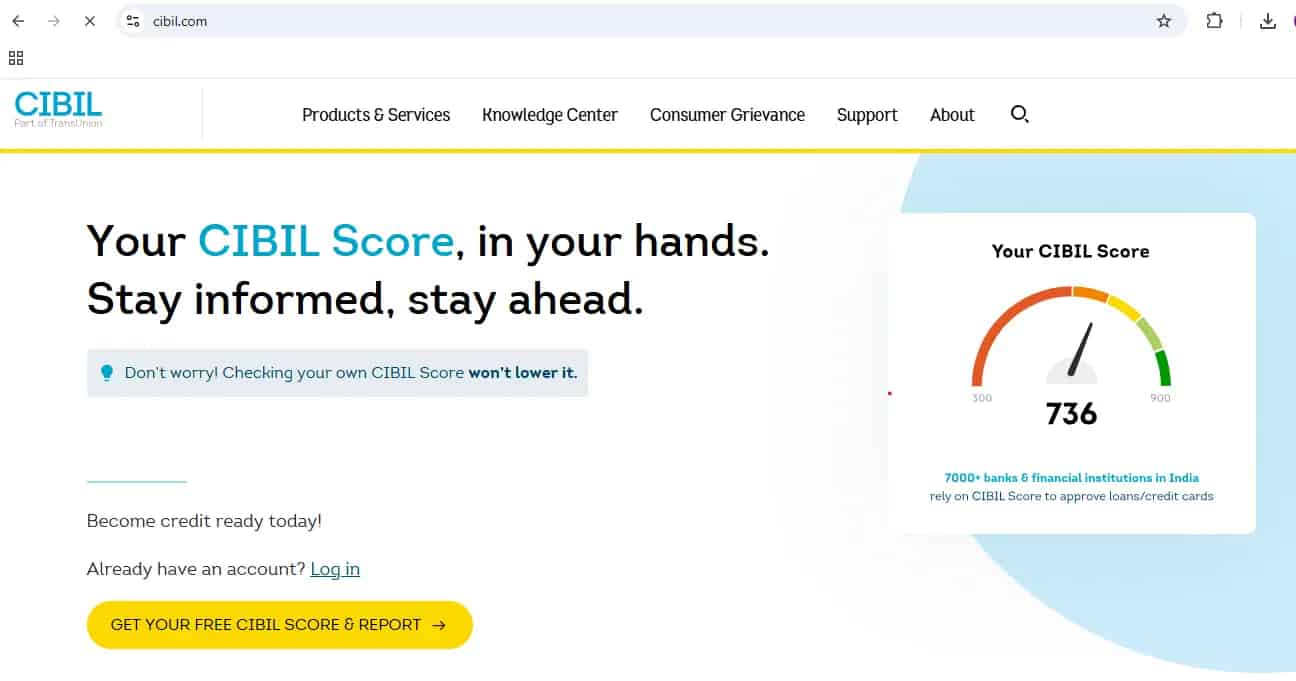
On the homepage, click:
This kicks off the registration process.
Step 2 — Enter your details (all fields are required)
You'll now see a form titled Enter Your Details.
Fill in:
- Email address (this becomes your username)
- Password and confirm password
- First name and last name
- ID Type and ID Number (such as PAN)
- Date of birth
- Pincode
- Mobile number
You'll also see a declaration statement allowing CIBIL to verify your identity.
⚠️ Important — be extremely careful here
While registering, every detail you enter becomes part of your CIBIL login identity.
If you make a mistake here — wrong email, wrong mobile number, wrong ID number, a spelling mistake in your name — correcting it later is genuinely difficult, and sometimes needs you to contact support with proof documents.
So before clicking Accept and Continue, double-check every field carefully.
This step takes one extra minute, but it can save you a lot of trouble later.
Once you've verified everything, tick the checkbox and click Accept and Continue.
Step 3 — OTP verification
An OTP gets sent to your registered mobile number. In some cases, you may also receive it on your email address, or on both.
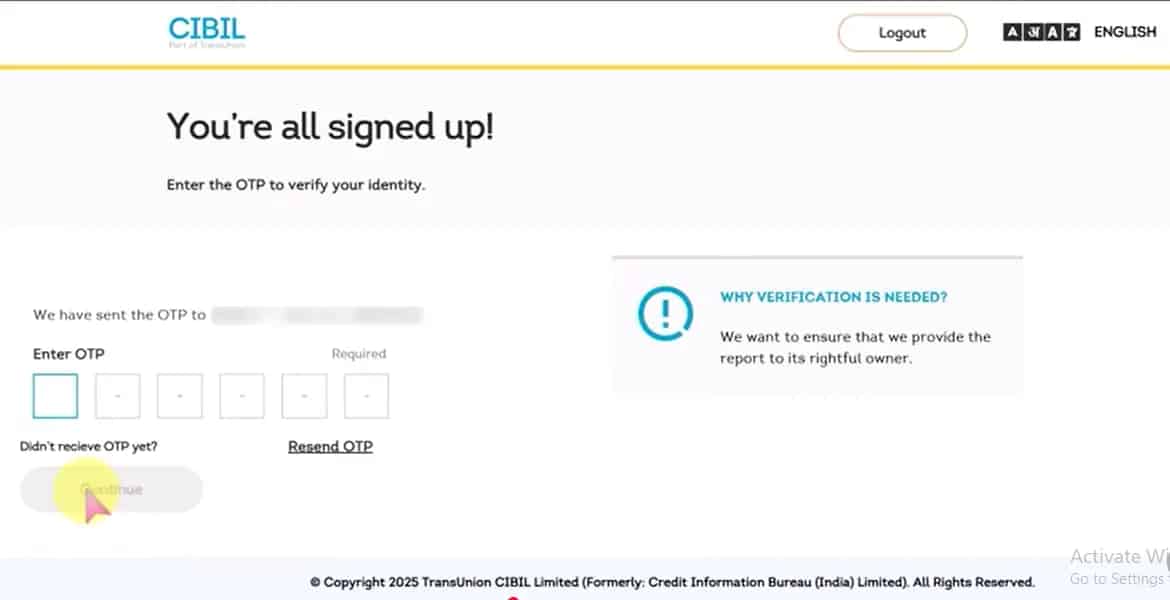
Enter the OTP you receive and click Continue.
Step 4 — "Is this a trusted device?"
You'll now see a screen asking:
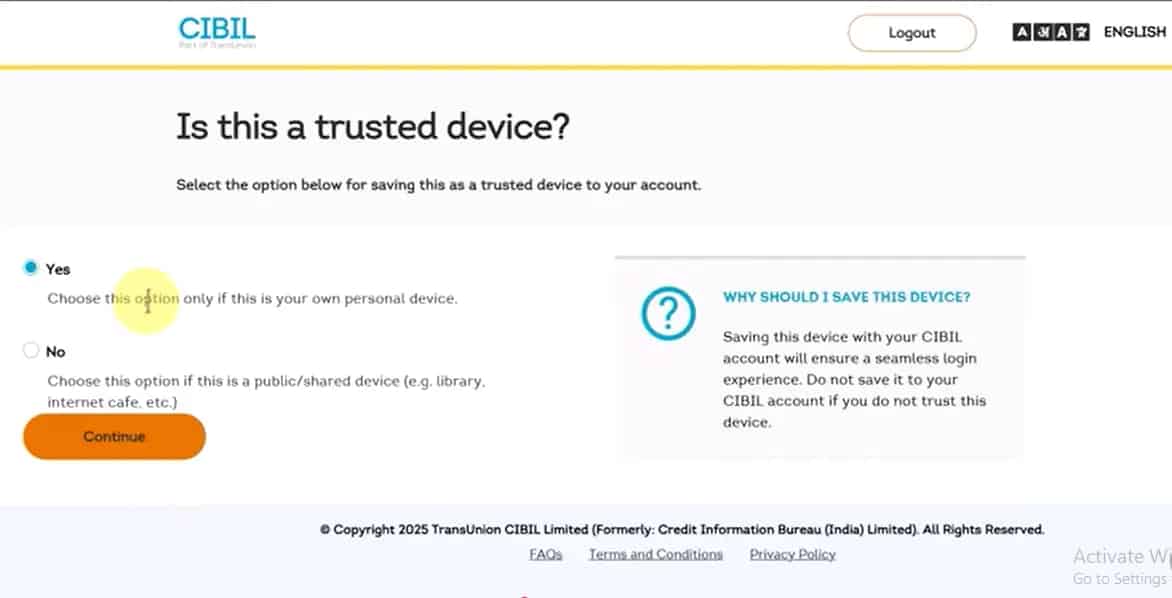
This is purely a security step.
- Choose Yes only if you're using your own personal phone or laptop
- Choose No if you're on a public or shared device
Then click Continue.
Step 5 — Signup successful → Go to Dashboard
You'll see a message saying Signup Successful.
Click Go to Dashboard.
You're now inside your CIBIL account.
Step 6 — Finding the CIBIL Report section
On the right side of your dashboard, you'll see a section titled:
CIBIL Report
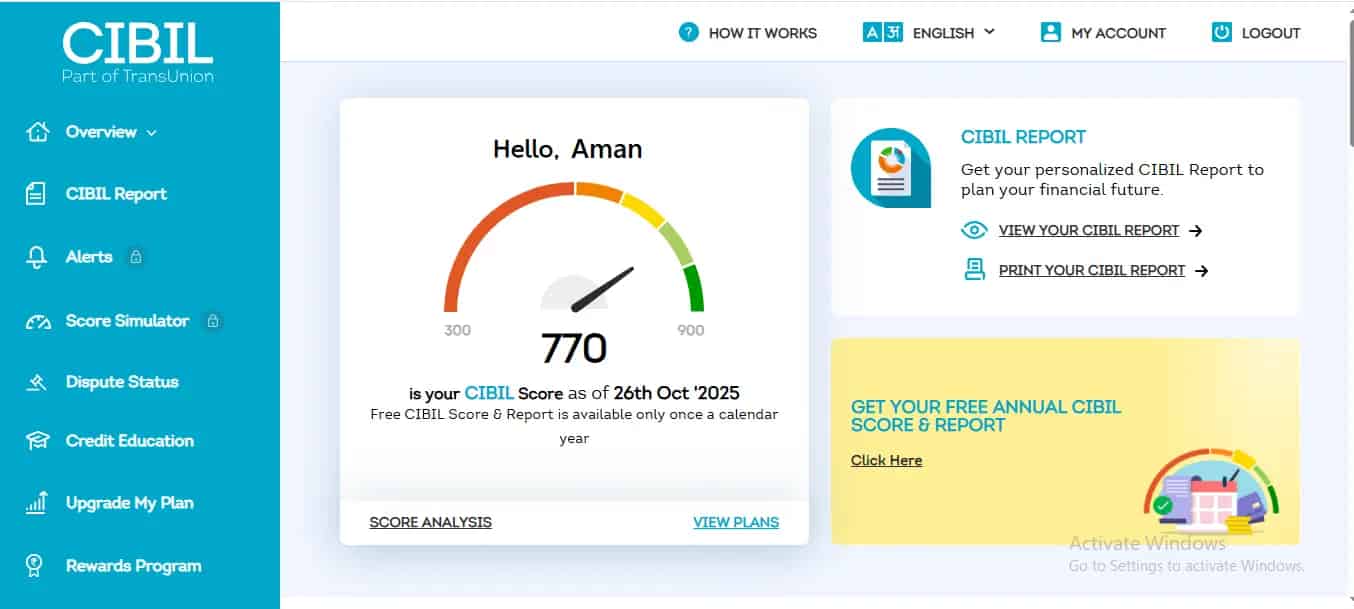
Under this, you'll see two options:
- View Your CIBIL Report
- Print Your CIBIL Report
Click Print Your CIBIL Report.
Step 7 — Save your report as PDF
A new tab will open.
You may see the print window appear directly. If it doesn't come up on its own, use your browser's Print option, or press Ctrl + P on your keyboard, then choose Save as PDF.
Save the file to your device.
That's it — you now have your complete CIBIL report downloaded as a PDF.
If you're already registered (existing users)
If you've already created an account before, there's no need to register again.
Click Login on the homepage.
You'll see two options:
- Login using OTP via mobile
- Login using username and password (your email is usually the username)
OTP verification happens again either way.
You'll again see the Trusted Device confirmation screen.
Choose the right option and click Verify and Proceed.
You'll land on the dashboard, where the steps to download your report are exactly the same as before.
What to do after downloading your report
Once you've got the report in hand, don't just file it away — go through it properly. Our guide on how to read your CIBIL report and understand every section walks through exactly what to check:
- Your personal details
- Every loan and card entry
- Your payment history
- Anything that looks off or unfamiliar
If you do spot an error, we've covered two ways to get it corrected — the standard dispute process inside your CIBIL account, or, if that route doesn't work for your situation, the online complaint method that doesn't even require login.
You can download reports from all four bureaus
A lot of people don't realise this, but you're entitled to a free credit report once a year from:
- CIBIL
- Experian
- Equifax
- CRIF High Mark
Rather than searching each website separately, you can access the official links directly here:
This saves time and makes sure you're always on the correct, genuine page.
Make this a yearly habit
Downloading your CIBIL report takes less than 10 minutes.
But it can save you from a rejected loan, a higher interest rate, and a fair amount of unnecessary stress later.
Make it a habit to check your credit report once every year. It keeps you aware, prepared, and genuinely in control of your credit profile.
0 Comments

No comments yet. Be the first to share your thoughts!